
Скачать Kingshiper Video Compressor – бесплатный, безопасный инструмент для сжатия видео и GIF для Windows, Mac, Android, iOS
Kingshiper Video Compressor — мощное, удобное в использовании программное обеспечение, разработанное для уменьшения размеров видео‑ и GIF‑файлов без потери качества. Будь вы создателем контента, менеджером социальных сетей или обычным пользователем, этот инструмент упрощает процесс сжатия больших медиа‑файлов для более быстрого обмена, загрузки или хранения. Поддерживая множество форматов, включая MP4, MKV, AVI, MOV, TS и другие, Kingshiper Video Compressor обеспечивает быстрые и эффективные результаты за секунды. Его интуитивный интерфейс и возможности пакетной обработки делают его идеальным для работы с несколькими файлами одновременно, экономя ваше время и усилия. Программа предлагает настраиваемые уровни сжатия и несколько методов компрессии, позволяя находить баланс между размером файла и визуальным качеством в соответствии с вашими потребностями. Доступный для Windows, Mac, Android и iOS, это кроссплатформенное решение гарантирует возможность сжатия видео в любое время и в любом месте. Скачайте Kingshiper Video Compressor сегодня и наслаждайтесь бесшовным, безопасным и удобным опытом.
Ключевые особенности Kingshiper Video Compressor
- Multiple Compression Methods: Choose from advanced algorithms tailored for different use cases—ideal for web uploads, mobile sharing, or archival storage.
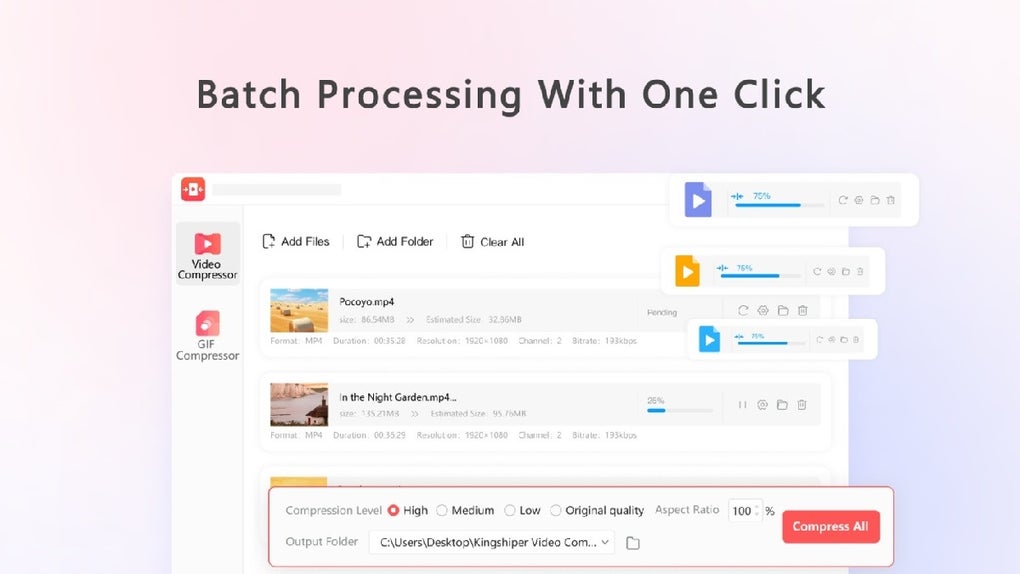
- Batch Processing: Compress multiple videos or GIFs simultaneously with a single click, dramatically improving workflow efficiency.
- Wide Format Support: Compatible with MP4, MKV, AVI, MOV, TS, MTS, WMV, and GIF formats, ensuring versatility across platforms and devices.
- Customizable Quality Settings: Adjust bitrate, resolution, frame rate, and other parameters to fine-tune compression results.
- Three GIF Compression Levels: Optimize animated images with low, medium, or high compression to balance file size and animation smoothness.
- Fast Processing Speed: Utilizes optimized encoding engines to compress files in seconds, even for high-resolution videos.
- Intuitive User Interface: Clean, responsive design makes it easy to load files, select settings, and start compression—no technical expertise required.
- Privacy-Focused: All compression happens locally on your device. No files are uploaded to servers, ensuring your content remains secure.
Как установить и использовать Kingshiper Video Compressor
Downloading and installing Kingshiper Video Compressor is straightforward and quick. Begin by visiting the official website and clicking the “Download” button. Choose the version that matches your operating system—Windows, Mac, Android, or iOS.
The installer is lightweight and typically under 50MB, ensuring a fast download even on slower connections. Once downloaded, run the installer and follow the on-screen prompts. The setup process takes less than a minute and requires no advanced configuration.
After installation, launch the application. You’ll be greeted with a clean, modern interface featuring a drag-and-drop zone for adding video files or GIFs. Simply drag your media files into the window, or click “Add Files” to browse your device. The software instantly analyzes each file and displays its current size, resolution, and duration. Next, select your preferred compression method from the dropdown menu—such as “Web Upload,” “Mobile Sharing,” or “Maximum Compression.” You can also adjust settings like target file size, resolution, and frame rate manually for precise control.
For batch processing, simply select multiple files before starting. Click the “Compress” button, and the software will process all selected files in sequence. Progress bars and real-time feedback keep you informed throughout. Once complete, compressed files are saved to your chosen folder, with the original files preserved unless you choose to replace them. The entire process is seamless, secure, and requires minimal user input—perfect for both beginners and professionals.
Совместимость и системные требования
Kingshiper Video Compressor is designed for broad compatibility across modern devices. It supports Windows 7 and later, including Windows 10 and Windows 11, making it suitable for most desktop and laptop users. For Mac users, the software runs on macOS 10.14 (Mojave) and higher, including Apple Silicon (M1/M2) Macs, ensuring smooth performance on the latest hardware.
Mobile users aren’t left out either. The Android version is available on Google Play, offering full compression functionality on smartphones and tablets. Similarly, the iOS app is available on the App Store, allowing iPhone and iPad users to compress videos and GIFs on the go. All mobile versions are optimized for touch interfaces and battery efficiency.
System requirements are modest, ensuring accessibility for most users. A minimum of 2GB RAM and 500MB of free disk space is recommended. For optimal performance, especially with high-resolution videos, 4GB RAM or more and a multi-core processor are advised. The software does not require a dedicated graphics card, making it ideal for older or budget devices. It runs smoothly on both 32-bit and 64-bit systems, with automatic updates to ensure compatibility with future OS releases.
Плюсы и минусы Kingshiper Video Compressor
Плюсы
- Extremely Fast Compression: Reduces large video files in seconds without lag or crashes.
- Batch Processing Efficiency: Handles multiple files at once, saving significant time for content creators.
- High Format Compatibility: Supports over 10 common video and animation formats, reducing the need for format conversion.
- Secure & Private: All processing occurs locally—no cloud upload means your videos stay private.
- Free to Download and Use: Offers full functionality without hidden costs or watermarks.
- Intuitive Interface: Even first-time users can compress files within minutes.
Минусы
- Limited Advanced Editing Tools: Focuses solely on compression—no video trimming, cropping, or filters.
- Mobile App UI Could Be Improved: Some users report minor interface inconsistencies on older Android devices.
- No Built-in Preview Feature: You cannot preview compressed output before finalizing—requires trial and error.
Frequently Asked Questions (FAQ)
Is Kingshiper Video Compressor free to download and use?
Yes, Kingshiper Video Compressor is completely free to download and use. There are no trial periods, subscription fees, or watermarks on compressed files. The software offers full access to all features without limitations.
Which video formats does Kingshiper support?
Kingshiper Video Compressor supports a wide range of formats including MP4, MKV, AVI, MOV, TS, MTS, WMV, and GIF. This ensures compatibility with most cameras, smartphones, and editing software.
Can I compress multiple videos at once?
Absolutely. The batch processing feature allows you to select and compress multiple files simultaneously with just one click—perfect for managing large media libraries.
Is my data safe when using this software?
Yes, your videos and GIFs are processed entirely on your device. No files are uploaded to the internet, ensuring maximum privacy and security.
Does the software update automatically?
Yes, Kingshiper Video Compressor includes an auto-update feature that checks for new versions periodically and notifies you when an update is available. Updates are free and include performance improvements and bug fixes.
Итоговое решение и призыв к действию
Kingshiper Video Compressor stands out as one of the most efficient, secure, and user-friendly tools for reducing video and GIF file sizes. Whether you're preparing content for social media, sending videos via email, or freeing up storage space, this software delivers reliable results without sacrificing quality. Its ability to compress multiple files at once, support for diverse formats, and strong privacy protections make it a top choice for both casual users and professionals.
With a clean interface, fast processing, and cross-platform availability, Kingshiper Video Compressor is a must-have tool in your digital toolkit. The fact that it’s completely free, with no hidden fees or limitations, adds even more value. If you're tired of dealing with oversized video files or struggling with slow uploads, it’s time to try this powerful solution.
Download Kingshiper Video Compressor today and experience fast, secure, and effortless video compression on Windows, Mac, Android, or iOS. Start optimizing your media files now!







